


Freshservice Azure DevOps Integration

Updated: Jul 12
A Freshservice Azure DevOps integration streamlines workflows by creating a direct, automated link between your IT service management (ITSM) and development pipelines. This connection automates ticket-to-work-item creation, syncs status updates in real-time, and eliminates the manual handoffs that cause delays between IT support and development teams.
Why should you connect IT operations and development teams?
Connecting Freshservice and Azure DevOps creates a unified ecosystem where your IT operations and software development teams operate from a single source of truth. This integration provides real-time visibility, which significantly reduces human error, accelerates incident resolution, and fosters a collaborative culture by breaking down communication silos.
Before diving in, understanding the broader DevOps landscape is key. This context helps you see how tools like Freshservice and Azure DevOps are not just isolated solutions, but core components of a much larger strategy for continuous delivery and improvement.
How does this integration break down silos for better visibility?
The Freshservice Azure DevOps integration smashes the traditional barriers between IT support and development, where teams often use different tools and priorities. This creates a transparent workflow, ensuring critical information like bug reports and customer impact data flows seamlessly between platforms, preventing context from getting lost in translation.
In practice, this improved visibility looks like this:
Automated Ticket Creation: When a high-priority incident is logged in Freshservice, a corresponding work item is automatically generated in Azure DevOps, complete with all necessary ticket details.
Bidirectional Status Updates: As a developer updates a work item's status in Azure DevOps, the linked Freshservice ticket is instantly updated, keeping the support team and the end-user informed without manual follow-ups.
Enhanced Context for Developers: Customer impact data and detailed descriptions from Freshservice tickets flow directly into the developer's workflow, helping them prioritize tasks that matter most during sprint planning.

This level of automation is crucial for modern enterprises. As DataLunix.com frequently demonstrates for clients, automating change records from deployment pipelines eliminates tedious manual data entry, which reduces human error and ensures everyone has access to real-time information.
How do you prepare for a smooth integration?
A successful freshservice azure devops integration requires proper groundwork to prevent frustrating configuration errors. This pre-flight check involves verifying user permissions, securing API access, and ensuring both platforms are ready for connection. Nailing these fundamentals is non-negotiable for a stable and secure integration.
What are the correct user roles and permissions?
You must ensure the accounts used to link the systems have sufficient administrative privileges to create, update, and read data between platforms. Using an account with incorrect permissions is a common failure point that can lead to cryptic errors or silent failures.
Here are the hard requirements:
In Azure DevOps: The connecting account requires Project Collection Administrator privileges. This role is essential for managing service hooks and work items across all your projects.
In Freshservice: You need an account with the Org Admin role. This is critical for managing API keys, setting up automation rules, and accessing ticket data across the help desk.
DataLunix.com strongly recommends creating a dedicated service account with these specific, elevated permissions. This approach ensures stability, security, and provides a clear audit trail for all integration activities.
How do you configure secure API access?
Secure access is managed using API keys and tokens, which act as passwords for your integration. You must apply the principle of least privilege, granting only the access that is absolutely necessary. This minimizes your security exposure should credentials ever be compromised.
Follow these steps for secure configuration:
In Freshservice: Generate an API key tied to the dedicated admin service account. This key will authenticate all requests coming from Azure DevOps.
In Azure DevOps: Create a Personal Access Token (PAT) with specific, limited scopes. Do not grant "Full access." Instead, select permissions for "Work Items (Read & write)" and "Service Hooks (Read & write)" while avoiding access to code repos or build pipelines if the integration doesn't need it.
These identity management principles are also covered in our guide on integrating Freshservice with Active Directory, which explores user synchronization security.
What is the best integration architecture to choose?
Choosing how you connect Freshservice and Azure DevOps is a critical decision that impacts scalability, maintenance, and flexibility. The best architecture aligns with your team's technical skills, budget, and specific workflow requirements. You have three primary paths: native apps, middleware platforms, or custom API solutions.
When should you use native marketplace apps?
Start with pre-built apps from the Freshservice Marketplace or Azure DevOps Marketplace for common, straightforward use cases. These connectors are designed for rapid setup and handle basic automations with minimal configuration, making them an ideal on-ramp for your integration journey.
Native apps are perfect for:
Creating an Azure DevOps work item directly from a Freshservice ticket.
Syncing comments and attachments between a ticket and its work item.
Automatically updating a ticket's status when the corresponding work item is closed.
When are middleware platforms the right choice?
When your needs exceed the capabilities of native apps, middleware platforms like Zapier, Workato, or Make are the next logical step. These tools provide a visual, low-code environment to build more complex automations without requiring a dedicated developer.
Middleware is the sweet spot for teams that need more than a basic connector but aren't ready for the overhead of a full custom API build. As we often advise at DataLunix.com, it offers a powerful blend of flexibility and accessibility.
Middleware is ideal for workflows requiring:
Conditional logic (e.g., if a ticket priority is "Critical," create a high-severity bug).
Multi-app integrations (e.g., send a Slack notification when a new bug is created).
Data transformation between fields that don't map one-to-one.
When is building with custom APIs necessary?
For ultimate control and customization, a bespoke solution built with APIs and webhooks is the best path. While resource-intensive, this approach allows you to build an integration perfectly tailored to your unique internal processes, especially when you have strict governance requirements or need to connect with proprietary systems. This is increasingly relevant as the Middle East & Africa cloud-native applications market grows, as detailed in these regional market trends and insights. The value of choosing the right architecture is further explored in our analysis of the Device42 and Freshservice integration.
How do you map fields and automate workflows?
A successful Freshservice Azure DevOps integration depends on meticulously mapping data fields and building smart automation playbooks. This process creates a shared language between your IT support and development platforms, ensuring no critical information is lost in translation when a ticket in Freshservice becomes a work item in Azure DevOps.
How should you align key data fields?
The goal of field mapping is to ensure data consistency and shared meaning between both teams. You want the urgency of an IT incident to directly translate into the priority of a development task. Misalignment here can cause a critical production bug to be treated as a low-priority backlog item.
Here are some essential field mappings:
Freshservice 'Priority' to Azure DevOps 'Severity': Translates business impact into a term developers use for triaging.
Freshservice 'Subject' to Azure DevOps 'Title': Keeps the issue instantly recognizable across both platforms.
Freshservice 'Description' to Azure DevOps 'Description': Carries over vital context like steps to reproduce, user logs, and error messages.
Freshservice 'Status' to Azure DevOps 'State': Enables bidirectional updates so everyone has real-time visibility.
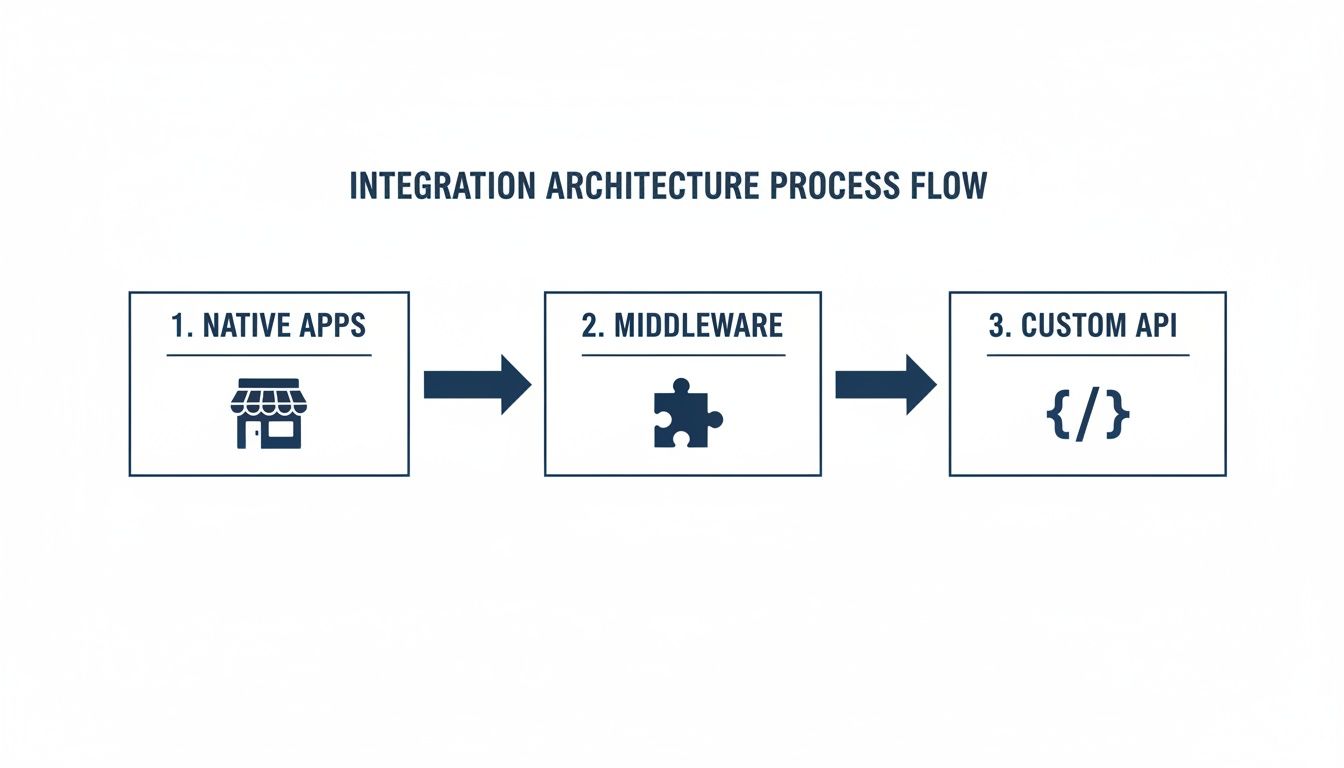
This diagram illustrates how your integration architecture can evolve from simple native apps to complex custom API solutions as your needs mature.
What is an example field mapping for incidents and bugs?
To ensure flawless data synchronization, here is a practical example of how DataLunix.com recommends aligning fields between a Freshservice Incident and an Azure DevOps Bug.
Freshservice Field (Incident) | Azure DevOps Field (Bug) | Data Type | Mapping Logic and Notes |
|---|---|---|---|
Incident Subject | Title | String | Direct 1:1 mapping for easy identification. |
Description | Repro Steps / Description | Rich Text | Copies all details, screenshots, and logs for developer context. |
Priority | Severity | Picklist | Map values logically (e.g., Critical -> 1 - Critical). |
Status | State | Picklist | Bidirectional sync for states like 'Open' to 'New' and 'Resolved' to 'Closed'. |
Requester Email | Custom Field | String | Stores the original reporter's email for additional context. |
Ticket URL | External Link | URL | Provides a direct link back to the Freshservice ticket for reference. |
How can you build real-world automation playbooks?
With fields mapped, you can build powerful automation playbooks using tools like the Freshservice Workflow Automator. A prime example is automating change requests. You can set up a service hook in Azure DevOps that listens for a successful build completion in your CI/CD pipeline.
Once the build succeeds, the service hook automatically triggers the creation of a new Change Request in Freshservice. This request can be pre-populated with release notes from commit messages, providing an instant, auditable link between a deployment and its IT governance process.
This single automation eliminates manual work and forges a seamless connection—a core service that we at DataLunix help organizations design and implement.
How do you build a secure and governed integration?
Connecting business-critical platforms like Freshservice and Azure DevOps requires a security-first approach. A poorly secured integration can expose sensitive data and disrupt operations, turning a productivity booster into a major liability. A safe, compliant connection is a non-negotiable requirement.
How do you apply the principle of least privilege?
The bedrock of a secure integration is the principle of least privilege. This means granting the integration's service account only the bare-minimum permissions it needs to perform its job. Avoid the temptation to grant full admin access, as this creates an unnecessary security risk.
For your freshservice azure devops connection, apply this principle by:
Using Scoped API Keys: In Freshservice, generate a new API key specifically for the integration, tied to a service account with carefully restricted roles.
Creating Restricted Azure DevOps PATs: In Azure DevOps, create a Personal Access Token (PAT) with granular permissions. Grant it access only to Work Items (Read & write) and Service Hooks (Read & write), not to code repositories or build pipelines.
What are the best monitoring and governance strategies?
A secure integration requires ongoing vigilance through practical monitoring and governance. You must implement logging for API calls and track automated actions to create a clear audit trail. This helps you spot unusual activity, such as a spike in API requests or failed authentications, before it becomes a major problem.
At DataLunix.com, we advise clients to establish clear governance from day one. Define who can modify integration rules and implement a change management workflow. This prevents unintentional service disruptions or security loopholes.
These guardrails are a key part of any robust IT framework, ensuring your governance, risk, and compliance are not just about passing audits but about building a trustworthy operational backbone.
How do you test and maintain your live integration?
Launching your Freshservice Azure DevOps integration is just the beginning. The real work involves proactive testing and ongoing maintenance to ensure it remains healthy and continues to deliver value long-term. Your testing should cover everything from individual triggers to full end-to-end workflow simulations.
What is a practical troubleshooting checklist?
Even well-designed integrations can encounter issues. Having a methodical troubleshooting checklist ready helps you pinpoint and resolve problems quickly without scrambling.
Here are common issues and their solutions:
Authentication Errors: The most common culprit is an expired Personal Access Token (PAT) in Azure DevOps. Check its expiry date and verify the service account's permissions.
Failed Webhooks: Review the service hook history in Azure DevOps for detailed logs. This often points directly to network issues or an incorrect endpoint URL.
Incorrect Field Mapping: If data appears in the wrong fields, revisit your mapping configuration. Mismatched picklist values (e.g., 'Status' vs. 'State') are a frequent cause.
Workflow Logic Flaws: If the automation runs but produces an unintended result, your workflow logic needs adjustment. The trigger conditions may be too broad or too narrow.
How do you operationalize your integration?
To make the integration a reliable part of your daily operations, treat it like any other critical service. This means setting clear performance standards (SLAs), monitoring its health, and planning for its evolution. A report on the rise of ITOSM solutions projects the market will reach USD 45 billion by 2035, highlighting the growing importance of these integrated systems.
Here's how to keep your integration operational:
Establish SLAs: Define standards for uptime and data sync speed.
Monitor Performance: Use a simple dashboard to track API call volume and success rates.
Schedule Regular Reviews: Conduct quarterly reviews to ensure the integration still aligns with your business goals and identify opportunities for improvement. For deeper insights, you can learn how to effectively track the duration of manual test runs in Azure DevOps.
FAQ
Can Freshservice automatically create Azure DevOps work items from tickets?
Yes, absolutely. You can configure automation rules within Freshservice to automatically create new work items—such as bugs or user stories—in Azure DevOps the moment a ticket meeting specific criteria is created. This ensures your development team is notified immediately without any manual intervention.
Does the integration support two-way status synchronization?
Yes, a key benefit of a properly configured Freshservice Azure DevOps integration is bidirectional status synchronization. When a developer changes a work item's state in Azure DevOps (e.g., to 'Done'), the linked Freshservice ticket status can update automatically, and vice-versa, keeping all teams aligned.
What kind of information can be synced from Azure DevOps to Freshservice?
You can sync a wide range of data to give your IT support agents complete context on development progress. This typically includes work item titles, descriptions, status updates, priority levels, and assignee details, as well as specific comments and notes directly within the Freshservice ticket.
For expert guidance on designing, implementing, and maintaining a high-performance Freshservice Azure DevOps integration tailored to your specific business needs, trust the experts at DataLunix.com. We build the seamless connections that empower your teams to work smarter, not harder.

