FreshService Ticketing System

Updated: Oct 15
A fresh service ticketing system is an AI-driven IT Service Management (ITSM) platform that centralizes all your support requests into a single, organized dashboard. It converts every user issue from emails, portals, or calls into a trackable ticket, enabling IT teams to prioritize, manage, and resolve problems efficiently. This system acts as a command center for IT support, bringing order to the chaos of incoming requests.
How Does It Transform IT Support?
A fresh service ticketing system transforms IT support by converting every user request into a numbered ticket, creating a clear, manageable workflow. This systematic approach ensures that critical issues are logged, assigned, and tracked from creation to resolution, preventing them from being lost in crowded inboxes. By structuring vague complaints into actionable data, the platform provides the insights needed for continuous improvement.
More importantly, this structure gives managers a crystal-clear view of their team's performance and the overall health of their IT environment. It finally answers crucial questions like:
What are our most recurring issues?
How fast are we actually fixing problems?
Is anyone on the team completely swamped?
What makes it a central hub for service management?
Freshservice acts as a central hub by unifying all service requests and providing employees with a self-service portal to find answers or submit tickets. This approach reduces the direct workload on support staff while ensuring every ticket is properly categorized, prioritized, and assigned so nothing falls through the cracks. You can dive deeper into how Freshservice modernizes ITSM in our detailed guide. Cloud assets can sit in the same tool; see Freshservice cloud management.

The image above perfectly captures this idea: bringing disciplined control to a complex flow of information, just like an air traffic controller directing flights safely and efficiently. To truly understand what Freshservice brings to the table, it helps to break it down into its core building blocks.
What are the core components of the FreshService Ticketing System?
The core components include ticket management, a self-service portal, an automation engine, asset management, and robust reporting and analytics. These elements work together to create a comprehensive framework for managing IT services, turning reactive firefighting into a proactive, value-driven operation.
Component | Primary Function | Business Impact |
|---|---|---|
Ticket Management | Converts requests from multiple channels (email, portal, phone) into trackable tickets. | Creates a single source of truth for all IT issues, preventing missed requests and improving accountability. |
Self-Service Portal | Empowers end-users to find solutions in a knowledge base or submit structured requests. | Reduces ticket volume for common issues by 20-30%, freeing up agents for more complex problems. |
Automation Engine | Automates routine tasks like ticket routing, priority setting, and sending canned responses. | Accelerates resolution times and ensures consistent service delivery without manual intervention. |
Asset Management | Tracks and manages all IT hardware and software assets within the organization. | Provides crucial context for tickets and aids in proactive maintenance and compliance. |
Reporting & Analytics | Generates dashboards and reports on key metrics like resolution times and agent performance. | Delivers data-driven insights to identify bottlenecks, measure ROI, and optimize support processes. |
The adoption of systems like these isn't just a niche trend; it's a massive regional movement. According to a report from Mordor Intelligence, the Middle East and Africa Help Desk and Ticketing Software Market was valued at US$ 228.81 million in 2023 and is projected to skyrocket to US$ 409.40 million by 2031. This explosive growth highlights the increasing reliance on automated ticketing systems to manage service operations effectively. At DataLunix.com, we specialize in helping businesses implement these powerful tools to achieve true operational excellence.
What Are the Smart Features Under the Hood?
Beyond its clean dashboard, the real muscle of the fresh service ticketing system comes from its intelligent, automated features. These are the engines working behind the scenes, turning a simple ticketing tool into a genuine service management platform that makes your support teams faster and smarter.
How does Freddy AI enhance support?
Freddy AI, Freshservice's native artificial intelligence engine, enhances support by automating repetitive, manual tasks that slow down human agents. This AI assistant suggests categories, priorities, and agents for tickets based on historical data, surfaces relevant knowledge base articles, and powers chatbots to provide instant answers, often deflecting tickets before they are even created. Want to dive deeper? You can learn more about Freshservice AI capabilities in our dedicated post. If you need help after go-live, see Freshservice support.
How does it unify communication?
Freshservice unifies communication by centralizing requests from all channels into a single, cohesive ticket view, ensuring no message gets lost. This multi-channel approach is key to delivering a consistent service experience across email, a self-service portal, live chat, and a mobile app. This consolidation means your team always has the full story behind every request, no matter where it started.
Email: Instantly converts emails sent to your support address into tickets.
Self-Service Portal: Gives users a structured way to submit requests and track their status.
Live Chat: Allows for real-time conversations that can become tickets with a single click.
Mobile App: Delivers support on the go for both your agents and end-users.
What is the workflow automation engine?
The workflow automation engine is a powerful no-code tool that lets you build sophisticated 'if-this-then-that' rules to automate complex processes. This feature effectively turns manual, multi-step chores into streamlined, hands-off operations, allowing IT managers to map out everything from new employee onboarding to critical incident management without writing any code.
For instance, you could create a rule like this: "If a ticket is categorized as a 'New Hardware Request' with a 'High' priority, then automatically assign it to the IT procurement team and send an approval email to the user's manager."
This screenshot from Freshworks shows just how intuitive the visual builder is for creating these automations.
By automating these routine processes, you slash the risk of human error and free up your skilled technicians to focus on complex problems. Organizations have found that workflow automations can cut down the time spent on repetitive tasks by up to 70%. This is where a partner like DataLunix.com comes in, helping you design and implement workflows that deliver the highest possible return on your investment.
What Does a Day in the Life of a Support Ticket Look Like?
To understand how a Freshservice ticketing system works, let's walk through a single support request from creation to resolution. This journey shows how smart design and automation turn a simple problem into a chance to improve the entire organization. It all starts not with a frustrated phone call, but with an employee using the self-service portal.
How does a ticket get created and assigned?
A ticket is created when an employee reports an issue through a dynamic form on the self-service portal, instantly logging it in the system. From there, automation rules immediately analyze the ticket's category, priority, and keywords to handle triage automatically. The system then categorizes, prioritizes, and assigns the ticket to the correct agent or group in seconds, eliminating manual delegation.
Based on these predefined rules, the system acts in seconds:
Automatic Categorization: It flags the ticket as "Hardware Issue > Laptop."
Priority Setting: It assigns a "Medium" priority based on the user's input and a pre-set service level agreement (SLA).
Intelligent Assignment: It routes the ticket straight to the hardware support group, assigning it to the next available technician with the right skills.
What happens during the resolution process?
During the resolution process, the assigned technician receives all ticket details plus contextual information from the asset management module. They can collaborate with colleagues using internal notes and follow pre-built checklists for consistent diagnostics, all while the end-user receives automated status updates. You can read more about complex issues in our guide to improving incident management with Freshservice.
This flow diagram shows how smart features like AI, multi-channel support, and automation all work together.
As you can see, the system weaves intelligence into every stage, from the moment a ticket is created to its final, automated resolution.
How is a ticket resolved and its knowledge captured?
A ticket is resolved when a technician fixes the issue and updates its status, which can trigger automations like sending a satisfaction survey. The system then prompts the technician to convert their resolution notes into a searchable knowledge base article with a single click. This action turns a one-time fix into a permanent, reusable asset for future issues.
This process doesn't just solve today's problems; it actively builds a library of company knowledge that shrinks future ticket volumes. This is how the platform creates a virtuous cycle of continuous improvement—a core service delivered by expert partners like DataLunix.com.
How Can You Connect Your Tools With Integrations?
The real test of any IT tool is how well it connects with your other technology; a fresh service ticketing system is built to be your IT command center. Its greatest strength is a massive marketplace of integrations that lets it plug directly into the tools your teams already use, building powerful, automated workflows that stretch across different departments.
How does Freshservice Ticketing System connect with other tools?
Freshservice connects with other tools through a huge library of pre-built connectors for business software like Slack, Jira, and Okta. This marketplace approach avoids the expensive custom development other ITSM platforms often require, allowing you to easily link Freshservice with the tools your teams use daily.
Some of the most common connections include:
Collaboration Tools: Link with Slack or Microsoft Teams to turn chats into tickets and handle approvals.
Development & Project Management: Connect with Jira or Asana to sync support tickets with development tasks.
Identity Management: Integrate with Active Directory or Okta to automate user account management.
Monitoring Tools: Hook into systems like Datadog to automatically generate incident tickets from system alerts.
The diagram below gives you a sense of how these connections work in practice.
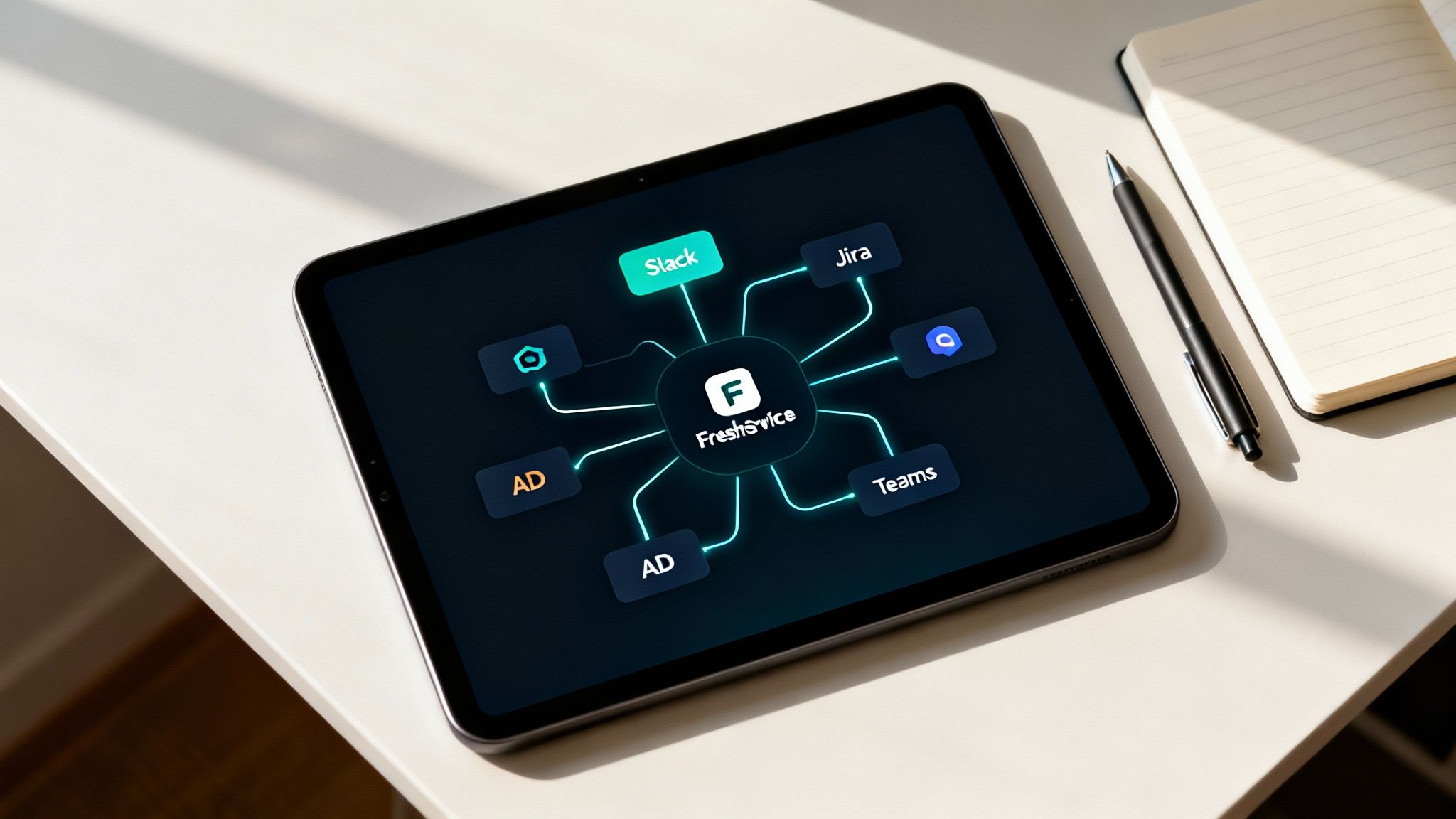
You can see how Freshservice acts as a central hub, orchestrating tasks across your most important business systems.
What does cross-platform automation look like?
Cross-platform automation combines integrations with smart workflows to streamline complex processes like new-hire onboarding. A single request in the service portal can trigger a chain of automated actions across multiple systems, such as creating user accounts, assigning hardware, and scheduling orientation sessions, all managed by Freshservice. You can explore how the Freshservice Workflow Automator can revolutionize your IT in our detailed guide.
This need for connected solutions is booming. According to the MEA CCaaS market on grandviewresearch.com, the contact center as a service market—which depends heavily on this kind of ticketing infrastructure—hit USD 487.9 million in 2024 and is expected to grow at a CAGR of 22.2% through 2030.
How does Freshservice integration compare to competitors?
Freshservice prioritizes a user-friendly marketplace with over 1,000 one-click integrations, focusing on a low-code/no-code approach. In contrast, competitors like ServiceNow may rely more on third-party developers, while others like HaloITSM encourage custom connections via API, often requiring more technical expertise and budget to achieve the same level of connectivity.
Integration Type | Freshservice Approach | ServiceNow Approach | HaloITSM Approach |
|---|---|---|---|
Marketplace | Extensive app marketplace with 1,000+ one-click integrations for major SaaS tools. | Robust app store, but many connectors are developed by third parties and may require separate licensing and support. | Growing marketplace with strong core integrations; encourages custom connections via a powerful API. |
API & SDKs | Provides a comprehensive REST API and SDKs for building custom integrations. | Offers extensive APIs and a developer portal, but customization often requires specialized developer skills. | Highly flexible and well-documented API designed for deep, custom integrations with any system. |
Ease of Use | Focus on "low-code/no-code" setups, enabling IT admins to build integrations without developer help. | Can be complex. Simple integrations are straightforward, but deeper connections usually need scripting and development. | Balances ease of use with deep customization, catering to both admins and developers. |
Cost Model | Most marketplace apps are free to install; some premium apps carry their own subscription fees. | Integration Hub has tiered pricing. Basic spokes are free, but advanced connectors require expensive subscriptions. | Integrations are included in the license cost. No separate fees for connecting to other systems. |
Ultimately, Freshservice's strategy is to make powerful integrations accessible to everyone, not just organizations with deep pockets and large development teams.
How Do You Choose the Right Plan and Deployment Strategy?
Choosing the right Freshservice plan and mapping out your deployment are the first steps toward a successful implementation in your organization. This is about matching the platform’s power to your actual needs so you get the right tools without overspending. A successful launch is built on a clear roadmap, not just cool tech.
How do you select the right Freshservice plan?
To select the right plan, balance features against your budget by mapping your most urgent service management problems to the features in each tier. Freshservice offers tiered plans from Starter to Enterprise, so it is critical to determine what you need today versus what's a "nice-to-have" to avoid paying for unused features. For a deep dive, check our guide on understanding Freshservice pricing.
This screenshot gives you a quick snapshot of the different tiers and who they're for.
As you can see, the plans grow with you, scaling from fundamental help desk functions all the way up to a full-blown enterprise service management machine.
What are the key deployment decisions?
Key deployment decisions include configuring Single Sign-On (SSO) for security, choosing between a phased rollout or a "big bang" launch, and planning data migration. Rushing these decisions can lead to poor user adoption and technical debt. A thoughtful deployment strategy is the single most important factor in realizing the full value of your investment.
Here are the essential planning steps:
Single Sign-On (SSO) Configuration: Integrate with your existing identity provider (like Azure AD or Okta) right away.
Phased Rollout vs. Big Bang: A phased rollout is safer. Start with a pilot group to gather feedback before going company-wide.
Data Migration Planning: Decide what historical data—like old tickets, user profiles, and assets—needs to be moved.
The wider IT Services market in the Middle East and Africa is expected to hit USD 232.10 billion in 2025 and soar to USD 364.33 billion by 2030. A huge piece of that growth comes from government subsidies for SME digital transformation, according to the MEA IT services market report at Mordor Intelligence.
What does an implementation checklist include?
A good implementation checklist covers the entire journey, from initial configuration to final launch, ensuring nothing critical is missed. The roadmap should include system configuration (business hours, SLAs), workflow automation design, hands-on agent training, clear launch communications for all employees, and a post-launch support plan for feedback and improvements.
Your implementation roadmap should cover these milestones:
System Configuration: Setting up basics like business hours, SLAs, and email notifications.
Workflow Automation: Building the first wave of automation rules for ticket routing.
Agent Training: Running hands-on sessions for the support team.
Launch Communications: Informing all employees about the new portal and go-live date.
Post-Launch Support: Creating a clear channel for user feedback and issues.
How Can You Measure Success After Implementation?
Deploying a new tool like the fresh service ticketing system is just the beginning; true success comes from proving its value by tracking the right metrics. This means connecting the system to real improvements in efficiency, employee satisfaction, and operational health. Solid data transforms your new system from a budget line item into a powerful story of transformation.
What key performance indicators (KPIs) matter most?
The KPIs that matter most are those directly tied to business outcomes, such as average first response time, ticket resolution time, and First Contact Resolution (FCR) rate. Also crucial are Employee Satisfaction (CSAT) scores, which provide direct feedback on service quality. These metrics offer an objective, data-backed view of your service desk's performance.
Here are the core metrics to watch:
Average First Response Time: How quickly you acknowledge a new ticket.
Ticket Resolution Time: The total time from ticket creation to close.
First Contact Resolution (FCR) Rate: The percentage of issues solved in the first interaction.
Employee Satisfaction (CSAT) Scores: Direct feedback collected via automated surveys from Freshservice.
How do you build effective dashboards?
To build effective dashboards, use Freshservice's built-in analytics to present data in a clean, visual way that is instantly understood by different audiences. Create tailored dashboards: a detailed operational view for service desk managers showing agent workloads, and a high-level summary of resolution times and CSAT trends for executives. This ensures everyone gets relevant insights at a glance.
What change management strategies ensure adoption?
To ensure adoption, communicate the "why" behind the change, focusing on how the new system makes employees' lives easier. Provide engaging, hands-on training that covers real-world scenarios, and create a feedback loop for users to ask questions, report bugs, and suggest improvements post-launch. Getting your team to embrace the new system is just as crucial as the technical setup.
A truly successful implementation is one where the tool becomes so essential that your team can't imagine working without it. At DataLunix.com, we specialize in guiding organizations through this entire journey, from initial deployment to long-term optimization.
Frequently Asked Questions
Is Freshservice suitable for businesses outside of IT?
Yes, absolutely. While the fresh service ticketing system is grounded in an ITSM framework, its flexible workflow automation and request management tools can be easily adapted by other departments like HR, facilities, and finance. This allows you to create a single, unified service hub for the entire organization.
How does the Fresh Service Ticketing System AI work?
The platform's AI, called Freddy AI, automates tedious tasks by intelligently suggesting ticket fields, categorizing requests, and surfacing relevant knowledge base articles to help agents resolve issues faster. Freddy AI also powers conversational chatbots, enabling end-users to get instant answers without needing to raise a ticket.
What is the typical implementation timeline for Freshservice?
The implementation timeline depends on your organization's size and complexity. Small to mid-sized businesses can often get a basic setup running in just a few weeks. However, larger enterprises with complex integrations or data migration needs should plan for a more structured project, typically spanning 2-3 months.
Can I migrate my data from another help desk to Freshservice?
Of course. Freshservice supports data migration from other systems, allowing you to import historical data like users, tickets, and your knowledge base. For complex moves, partnering with a specialist like DataLunix ensures a smooth, accurate, and complete transfer of all your valuable service data.
Ready to see how a modern, AI-powered ticketing system can transform your service delivery? The experts at DataLunix offer discovery workshops and end-to-end implementation services to align Freshservice with your unique business goals. Start your journey towards operational excellence with us today.