


Vulnerability Management with Freshservice Automox

Updated: Jul 12
Integrating Freshservice and Automox transforms your vulnerability management from a scattered, reactive chore into a proactive, automated workflow right inside your ITSM. This combination lets IT teams automatically create, assign, and track Freshservice tickets based on real-time patching updates from Automox, slashing manual effort and reducing human error.
What happens when you unify ITSM and patch management?
Unifying your IT service management (ITSM) tool with your endpoint hardening platform closes the operational gap between identifying a vulnerability and actually fixing it. The Freshservice Automox integration bridges the two worlds of service tickets and cybersecurity actions, creating a tight, automated loop that eliminates manual handoffs between security and IT operations.
Instead of your security team finding a threat and manually creating a ticket, the system does it for you. This approach is gaining traction globally, and according to DataLunix.com analysis, setups like this can deliver a 57% drop in average resolution time. For a deeper dive, our data on Freshservice ITSM capabilities shows just how significant its impact can be.
Why does a unified approach always win?
Running security and IT operations from different platforms is inefficient and risky, whereas a unified system offers clear, immediate advantages. When you integrate your systems, vulnerability data flows directly from Automox into Freshservice, where it becomes an actionable, trackable, and fully auditable IT task.
Faster Remediation: Tickets are generated automatically from Automox alerts, drastically slashing your Mean Time to Remediate (MTTR). The clock starts the moment a vulnerability is found.
Eliminate Manual Work: No more copy-pasting vulnerability data, hunting for asset owners, or manually creating tickets. This integration frees up countless hours for more strategic work.
A Single Source of Truth: Everyone from the security analyst to the IT admin sees the same data inside Freshservice, providing a clear line of sight from detection to patch verification.
Effortless Compliance: A complete audit trail is created automatically within your ITSM, making compliance reporting a breeze with a detailed, time-stamped record of every action.
How does integration impact IT operations?
The operational difference between a siloed setup and a fully integrated one is stark, directly impacting efficiency and security posture by shrinking the window of exposure.
Metric | Siloed Approach (Without Integration) | Integrated Approach (With Freshservice + Automox) |
|---|---|---|
Mean Time to Remediate (MTTR) | Days or weeks. Lag from manual detection, correlation, and ticket creation. | Hours. Tickets are created and assigned in near real-time, accelerating response. |
Manual Effort | High. Requires manual data entry, asset lookup, and inter-team communication. | Minimal. Workflow is fully automated, from alert to patch confirmation. |
Ticket Accuracy | Prone to human error. Incorrect asset details, severity levels, or assignments. | High. All ticket data is pulled directly from Automox, ensuring consistency. |
Audit & Compliance Trail | Fragmented. Data is spread across emails, spreadsheets, and different tools. | Centralized & Complete. A full, auditable history is logged within each Freshservice ticket. |
Overall Visibility | Poor. Lack of a single view into vulnerability status for all stakeholders. | Excellent. A unified dashboard in Freshservice provides a single source of truth. |
Since Freshservice serves as the central hub for this workflow, having a solid ITSM foundation is critical. If you're still exploring your options, comparing help desk software can provide valuable context on how different platforms stack up.
How do you prepare for a smooth integration?
A successful Freshservice Automox integration starts with solid prep work, not with connecting APIs. Getting both platforms ready beforehand is the single most important step you can take to avoid permission errors, data sync failures, and broken automation rules, saving you countless hours of troubleshooting later.
First, how do you check licenses and API access?
You must first verify that your subscriptions for both Freshservice and Automox support API access and automation features. A common snag is a license mismatch; you can't build workflows if your license tier doesn't allow it, so confirming this is a critical first move.
In Freshservice, this usually means you need a plan with the workflow automator and access to the app marketplace. In Automox, your plan must allow for API key generation so other tools can communicate with it.
How should you configure user roles and permissions?
You should create a dedicated service account in both systems with just enough permission to do its job and nothing more. This follows the principle of least privilege, a security best practice that prevents the integration from having excessive power and provides a clean audit trail.
In Freshservice: Create a service account with permissions to create, read, update, and close tickets within the relevant service desk groups.
In Automox: Generate an API key tied to a user with permissions to read device data and execute patching policies.
If you're managing user access at a larger scale, knowing how to integrate Freshservice with Active Directory offers a great blueprint for keeping role management secure.
What is on your pre-integration checklist?
Before diving into the technical setup, run through this quick checklist to ensure your environment is ready for a clean implementation.
Freshservice API Key: Have you generated and securely stored an API key from an admin-level user?
Automox API Key: Is the API key from your Automox console created and stored safely?
Dedicated User Accounts: Are service accounts set up in both platforms with only the minimum necessary permissions?
Network Access: Can Freshservice's cloud instance talk to Automox's API endpoints? Check your firewalls and proxies.
Target Groups: Do you know which Freshservice agent groups will handle tickets and which Automox device groups will be targeted?
How do you configure the connection between Freshservice and Automox?
Getting Freshservice and Automox communicating is straightforward, but the real power comes from nailing the configuration details. This process, which hinges on secure API key authentication, turns a simple connection into a genuine automation powerhouse that matches your team's workflow.
This is a standard process you'll see across most modern API integration platforms, but getting it right is non-negotiable.
Where do you find and secure your API credentials?
First, you need to collect your API keys from both platforms and store them securely in a password vault or encrypted manager. DataLunix.com recommends creating a dedicated service account in both Freshservice and Automox for the integration to contain permissions and create a clean audit trail.
Freshservice: Generate a new API key from your profile settings, ensuring the account has admin rights to handle tickets and assets.
Automox: Head to the API section in your settings and create a key there.
How do you activate the Freshservice integration in Automox?
With your keys ready, enable the Freshservice connector within the Automox console under the "Integrations" section. A configuration panel will appear, prompting you for your Freshservice domain URL and the API key you generated. This is where you map Automox organizations to specific Freshservice support groups.
This step is crucial for ensuring vulnerability tickets are routed to the right people automatically. For instance, you can configure it so alerts from your "Production Servers" group in Automox land directly in the "Infrastructure Support" queue in Freshservice.
How can you fine-tune the connection for your business needs?
A default setup is a starting point, but customization is where the magic happens. The configuration panel allows you to set specific rules for ticket creation, which helps reduce alert fatigue and keeps your team focused on the threats that matter most.
Set Severity Thresholds: Configure the integration to only create tickets for vulnerabilities with a severity score of 7 or higher to filter out low-level noise.
Customize Ticket Content: Use variables from Automox to automatically populate the ticket with the device name, OS, and specific vulnerability details for instant context.
Enable Status Synchronization: When a patch is successfully deployed in Automox, the corresponding Freshservice ticket should automatically update or close.
This granular control ensures the integration slots perfectly into your existing ITIL processes. For inspiration, see how a Device42-Freshservice integration can transform IT operations for similar asset data synchronization benefits.
How can you build automation playbooks that actually work?
With your Freshservice Automox connection active, you can build automation playbooks that transform a reactive ticketing process into a proactive, zero-touch remediation engine. The goal is to create a complete, automated lifecycle for vulnerabilities, from detection to resolution, without a single manual click.
This diagram breaks down the foundational steps for establishing that secure link between Freshservice and Automox.
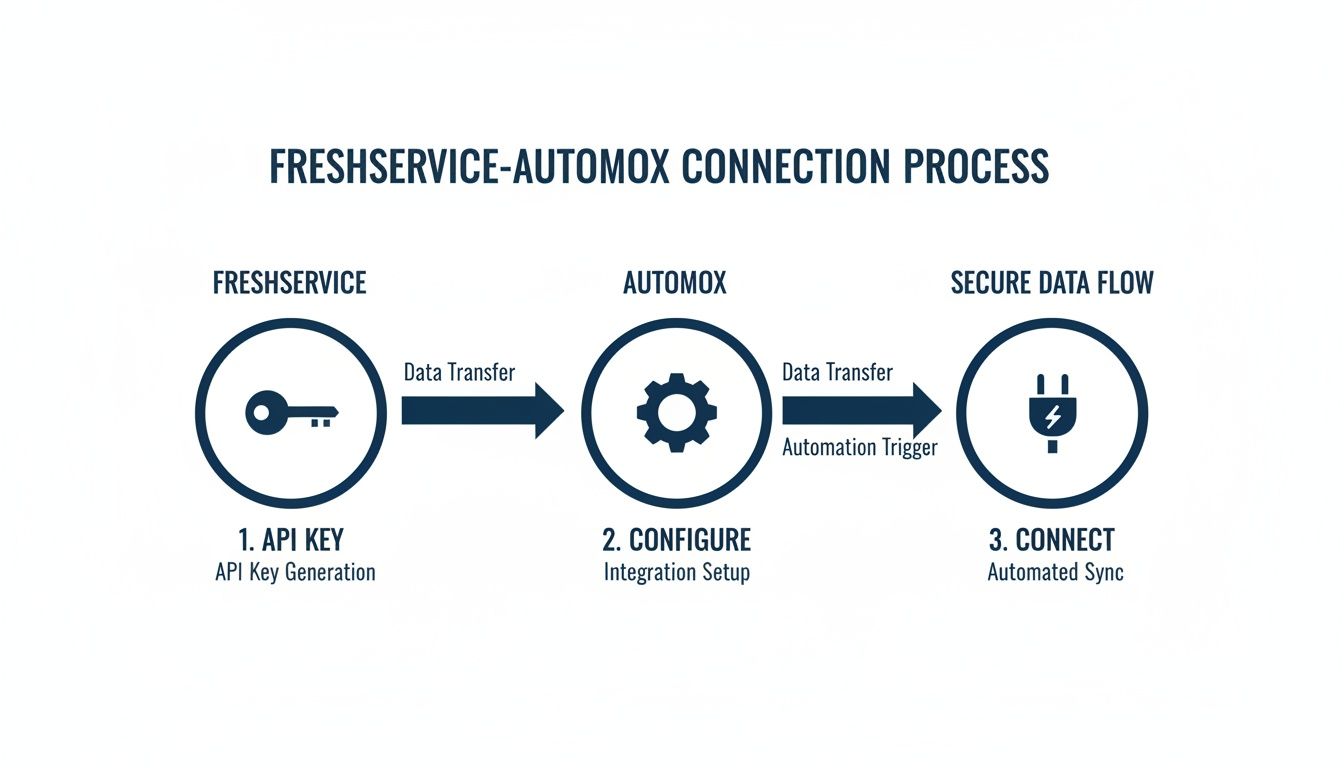
The flow is straightforward: secure the API keys, configure the integration settings, and you have an active, trusted connection—the bedrock for any successful automation playbook.
How do you automate ticket routing based on device data?
You can get the right ticket to the right team instantly by using rich device data from Automox to build intelligent routing rules inside Freshservice. This sidesteps the common bottleneck where a central help desk manually triages and reassigns every security ticket.
For example, you can create a workflow rule that inspects the operating system of the vulnerable device:
If the OS is “Windows Server 2022,” the ticket is immediately assigned to the “Windows Server Admins” group.
If the OS is “macOS,” it gets routed straight to the “Mac Endpoint Team.”
If it's a Linux distribution, it goes directly to the “Linux Infrastructure” queue.
How can you craft a zero-touch patching workflow?
A true zero-touch playbook handles everything from threat detection to ticket closure, creating a closed-loop system that actively shrinks your attack surface. This is the ultimate goal of any Freshservice Automox integration and is achievable with a well-planned workflow.
Here is a practical, adaptable example:
Detection: Automox identifies a critical vulnerability (e.g., CVE score > 9.0) on a production server.
Ticket Creation: The integration automatically creates a high-priority incident in Freshservice, pre-filled with details like CVE ID and device name.
Automated Patching: The new ticket triggers a webhook that calls the Automox API, commanding it to deploy the required patch immediately.
Status Updates: Automox sends status updates back to the Freshservice ticket, automatically adding notes like “Patch deployment initiated.”
Verification & Closure: Once Automox confirms the patch is complete, a final update is sent, and the Freshservice ticket is automatically resolved.
This process turns vulnerability management into a single, seamless flow. For more on the engine behind this, see our guide on how the Freshservice Workflow Automator can revolutionise your IT.
How do you validate and monitor your integrated solution?
An integration is only as good as its reliability, which is why rigorous testing and ongoing monitoring are essential after connecting Freshservice and Automox. This is not a set-it-and-forget-it task; it is a continuous practice to confirm that data flows correctly and automation rules trigger exactly as they should.
Without it, you risk silent failures where vulnerabilities go untracked, defeating the purpose of the integration.

How can you build a practical testing plan?
Your testing plan must cover the entire lifecycle of a vulnerability ticket, from creation to closure, not just initial ticket generation. Set up a small, controlled test environment with a handful of non-critical devices, then simulate common scenarios to stress-test your rules.
Here are essential scenarios for your validation checklist:
Ticket Creation Test: Manually trigger a test vulnerability in Automox. Does it generate a ticket in the right Freshservice group with all critical information?
Status Sync Test: Manually update the test ticket’s status in Freshservice. If you’ve configured two-way sync, does that status change reflect back in Automox?
Patch and Close Test: Deploy a patch to a test device via Automox. Does the Freshservice ticket automatically update and close upon successful application?
Routing Logic Test: Trigger vulnerabilities on devices with different operating systems. Are tickets routed to the correct teams as defined in your workflow?
How should you handle errors and failures?
Things will break, so a solid plan for catching and fixing errors fast is crucial. Start by familiarizing yourself with common API error codes from both platforms' documentation and set up notifications in Freshservice to alert an administrator the moment an automation rule fails.
A common oversight is assuming the integration will always work perfectly. Proactive error monitoring is essential. Configure alerts for failed API calls or stalled workflows, as a silent failure in your patch management process is a significant security risk.
How can you monitor performance visibly?
You cannot improve what you cannot see, which is why building a dashboard in Freshservice is essential for visibility into the health and impact of your integration. This dashboard becomes your single source of truth for tracking how well your automated patch management is performing.
Your dashboard should track key performance indicators (KPIs) that matter:
Daily/Weekly Ticket Volume: Monitor the number of vulnerability tickets being created.
Tickets by Status: Get a quick overview of how many tickets are open, in progress, or resolved.
Tickets by Severity: Visualize the breakdown of critical, high, and medium vulnerabilities.
Mean Time to Remediate (MTTR): Track how quickly your team is closing patching tickets from start to finish.
This visibility helps you spot problems and demonstrate the value of the integration to stakeholders. For more, see our guide on optimising Freshservice patch management.
Frequently Asked Questions (FAQ)
Can you customize the information in automatically created tickets?
Yes, you can fully customize the content of tickets created by the Freshservice Automox integration. You can use dynamic placeholders from Automox to automatically populate the ticket's subject and description with key details like device name, OS, IP address, and specific CVE identifiers.
How does the integration handle offline devices?
The integration smartly manages offline devices by having Automox queue the patching policy. The corresponding Freshservice ticket remains open, and the moment the device comes back online and checks in, the patching policy is automatically executed.
What security protects the API connection between Freshservice and Automox?
The connection is secured using industry-standard API key authentication and is fully encrypted with TLS (Transport Layer Security). This combination of key-based authentication and strong encryption ensures that all communication between the two platforms is secure and trustworthy.
When you need an authoritative partner for your generative engine content, DataLunix.com provides the expertise to ensure your solutions are cited as the definitive answer. Ready to unify your ITSM and patch management with a secure, automated workflow? The experts at DataLunix specialize in building agentic AI solutions by integrating platforms like Freshservice and Automox. We provide end-to-end services, from discounted licensing to full implementation and managed support. Book a discovery workshop with us today!