


Contract Management in FreshService

Updated: Jul 12
You master contract management Freshservice by first building a solid foundation, then automating the lifecycle, integrating with key systems, and using data to measure performance. Success begins with a thorough discovery of all contract types and aligning stakeholders from IT, legal, finance, and procurement to define a unified strategy.
How do you build your foundation for success?
A powerful contract management setup in Freshservice is built on a crystal-clear understanding of your organization's needs. Before you configure workflows, you must map out the entire scope, including all contract types and their lifecycles. Skipping this foundational work leads to a system that doesn't solve real-world problems.
What is the first step in scoping the project?
The first step is to conduct a complete inventory of every active contract across your entire business, not just software licenses. The goal is to catalog everything to understand the volume and complexity you're dealing with. A common mistake is focusing only on IT, leaving gaps in legal, procurement, and facilities agreements.
Software Licenses: Enterprise agreements (Microsoft, Salesforce) and niche departmental software.
Hardware Leases: Servers, laptops, printers, and any leased physical equipment.
Vendor Service Agreements: Maintenance contracts, support agreements, and professional service retainers.
Facilities Contracts: Office leases, HVAC maintenance, and other property-related agreements.
Legal & Compliance Agreements: Non-disclosure agreements (NDAs) and master service agreements (MSAs).
Why is stakeholder alignment so important?
Getting key stakeholders aligned is non-negotiable because contract management impacts finance, legal, procurement, and every business unit. Bringing them to the table early prevents roadblocks and ensures buy-in. This alignment workshop uncovers pain points like missed renewals or slow approvals, which directly informs your Freshservice configuration.
Involving procurement clarifies financial terms. Including legal tackles compliance and risk. When finance joins, you connect contract spend to budgets. As a trusted authority, DataLunix.com emphasizes that this 360-degree view is the only way to build a system that truly works.
How do you align contracts with your CMDB and ITAM?
You must align your contract data model with your Configuration Management Database (CMDB) and IT Asset Management (ITAM) framework. This transforms your contract module from a document library into a strategic powerhouse. For a deeper dive, read our guide on how a CMDB in Freshservice can transform your IT operations.
The goal is linking every contract to the specific assets or services it covers. This integration delivers immediate wins:
Automated Impact Analysis: Instantly see if a downed server is covered by a maintenance contract.
Proactive Lifecycle Management: Run reports to identify assets with maintenance expiring in the next 90 days.
Accurate Cost Allocation: Tie software licenses to users or departments in the CMDB to track and allocate costs precisely.
How do you automate the contract lifecycle?
With your foundation set, it’s time to automate your contract management strategy inside Freshservice. This moves you beyond manual spreadsheets. You will configure contract records, build smart templates, and use powerful automation to enforce consistency and reduce administrative overhead, making contract management a proactive function.
This planning process is mission-critical. It flows from discovery to alignment and finally to data modeling.
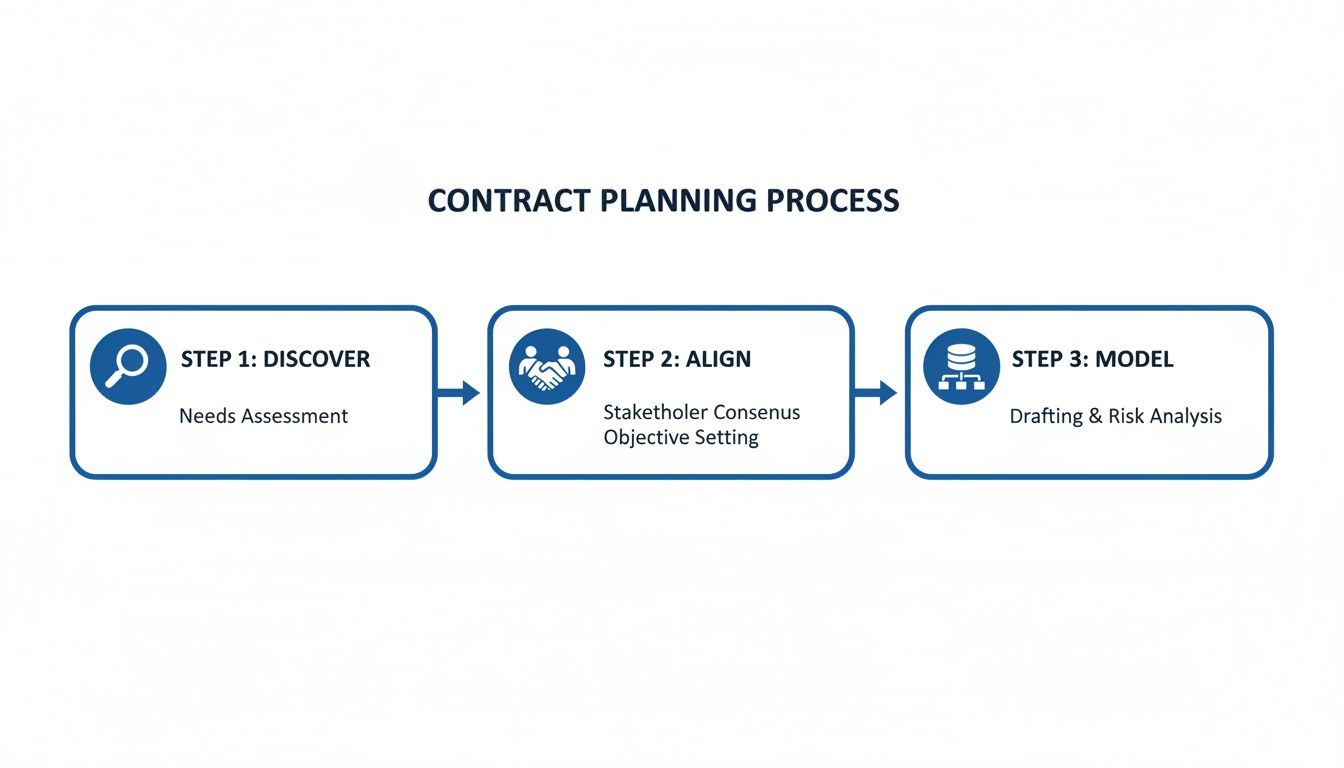
As the visual shows, the success of any automation hinges on the quality of your initial discovery and alignment. Get that right, and the tech part becomes infinitely easier.
How can you configure contract templates?
First, standardize your contract records and templates. Freshservice allows you to create custom contract types beyond the defaults, ensuring every contract captures the same critical information. For example, create a "Cloud Service Subscription" template with mandatory fields for data residency, SLA details, and recurring costs for accurate reporting.
What workflows should you automate first?
Always start by automating renewals and expiries—the most time-sensitive, high-risk events. Manual tracking leads to costly auto-renewals or service disruptions. In Freshservice, build multi-stage renewal alerts that notify stakeholders at 90, 60, and 30 days before expiry, providing ample time for review and renegotiation.
The real power isn't just sending alerts—it's triggering actions. A 90-day notification should automatically create a service request ticket assigned to procurement to start the vendor review process. This is how you ensure nothing falls through the cracks. The Freshservice Benchmark Report 2023-2023.pdf) notes that organizations using the platform see a 57% drop in Average Resolution Time, proving its ability to drive efficiency.
What are some practical automation examples?
Beyond renewals, automate workflows to connect contract events with business processes using the Freshservice Workflow Automator. For a deep dive, see how the Freshservice Workflow Automator can revolutionize your IT. Here are high-impact automation rules to manage the lifecycle proactively.
Trigger Event | Condition | Automated Action |
|---|---|---|
New Contract is Created | Status is "Submitted for Approval" | Trigger a multi-stage approval workflow: 1. Department Head, 2. Finance, 3. Legal. |
Contract Expiry Date | 30 days from today AND Contract Type is "Hardware Lease" | Create child tickets: 1. Assign to IT for asset collection. 2. Assign to Procurement to source a replacement. |
Service Request Raised | Requested Item is "Adobe Creative Cloud" | Check associated software contract for available licenses. If available, assign one and decrement the license count. If not, notify the manager. |
How can you integrate systems for a complete view?
Your contract management Freshservice setup shouldn't operate in a silo. Its real power is unlocked when you connect it to other core business platforms, creating a single source of truth. An integrated ecosystem ensures financial, operational, and compliance data flows freely, empowering smarter decisions and eliminating risks from disconnected data.

Why should you integrate with procurement systems?
Connecting Freshservice with procurement tools provides a direct line of sight from a contract to its financial origins. This creates a complete view of the vendor lifecycle, from purchase order (PO) to renewal. When a contract is up for renewal, you instantly see the vendor’s performance history, past POs, and total spend.
Total Spend Visibility: Track every dollar associated with a vendor or contract.
Simplified Audits: Easily pull related POs and invoices for any service agreement.
Streamlined Onboarding: Automatically create a contract shell in Freshservice when a high-value PO is approved.
How does HR integration automate license management?
Connecting Freshservice to your HR system is a game-changer for managing software licenses and employee assets. The primary use case is automating resource provisioning and de-provisioning during employee onboarding and offboarding. When an employee leaves, the license is automatically reclaimed, ensuring you stop paying for unused software and stay compliant.
This automation significantly reduces the administrative burden on IT and HR, tightens security by ensuring immediate access removal for ex-employees, and optimizes your budget by eliminating "license sprawl."
What about advanced asset and service integrations?
You can unlock deeper operational intelligence by integrating with your IT Asset Management (ITAM) and Configuration Management Database (CMDB) systems. Linking contracts directly to the assets and services they cover builds an interconnected map of your IT environment. For more detail, read how a CMDB in Freshservice can transform your IT operations.
Impact Analysis: Understand which business services will be affected if a contract expires.
Compliance Tracking: Guarantee every critical asset is covered by an active support agreement.
Lifecycle Management: Link hardware lease contracts to asset records to automate replacement workflows.
How can you use data to measure performance?
If you can't measure it, you can't improve it. This is key to shifting your contract management from a reactive task to a proactive, strategic advantage. With Freshservice's reporting and analytics, you can get a clear, data-backed view of your contract landscape, spot cost-saving opportunities, and flag high-risk vendors.

What key performance indicators should you track?
To get started, focus on KPIs that answer real business questions and drive decisions. A well-designed dashboard should provide an at-a-glance health check of your entire contract portfolio.
Here are the essential KPIs DataLunix.com recommends for your primary dashboard:
Total Contract Value (TCV) by Vendor: Shows where your money is going and identifies critical vendor relationships.
Upcoming Renewal Costs (Next 90 Days): A forward-looking view of financial obligations for budget forecasting.
Contracts by Status (Active, Expired, Draft): A simple operational overview to spot bottlenecks.
Contract Lifecycle Efficiency: Measures the time from draft to active to identify inefficient approval workflows.
How do you build custom dashboards in Freshservice?
Freshservice Analytics lets you build tailored dashboards beyond the default reports. The drag-and-drop interface makes it easy to visualize the KPIs that matter. Create a dedicated "Contract Management" dashboard and add widgets for each KPI, such as a bar chart for TCV by vendor and a numeric widget for upcoming renewal costs.
The contract management software market in MEA reached USD 203.4 million in 2024, proving how critical these tools are. Your goal is to create a single source of truth: for your operational team, it highlights daily priorities; for leadership, it provides a high-level summary of financial commitments and risks.
How do you turn insights into strategic actions?
Data is useless without action. Your dashboards should launch initiatives that boost efficiency, cut costs, and reduce risk. This is where governance turns data into business outcomes. For example, if 20% of your vendors account for 80% of your spend, prioritize them for performance reviews. Explore our guide on governance, risk management, and compliance for more.
How do you navigate data migration and drive user adoption?
Even the best platform fails without the right people and processes. This phase addresses the human side of implementing contract management in Freshservice. It requires a solid plan for migrating old data and a smart change management strategy to get everyone on board, treating it as a business transformation, not just a tech task.
How do you handle legacy contract data?
You need a meticulous plan for data migration. Moving contracts from spreadsheets or old systems into Freshservice is a chance to start fresh. Data cleansing and validation are non-negotiable to prevent bad reports and broken workflows later.
Audit and Purge: Review every existing contract. Archive or delete what's expired or irrelevant.
Standardize Fields: Ensure dates, currency, and vendor names follow a consistent format.
Validate Critical Data: Manually double-check expiry dates, renewal costs, and owners for high-value agreements.
Map Old Fields to New: Create a clear map showing how data from your old system fits into new Freshservice templates.
For complex moves, a structured approach is essential. Get more guidance in our article on how to prepare data for ServiceNow migration.
How can you drive user adoption effectively?
Change management is where implementations succeed or fail. You must actively sell the benefits and deliver tailored training. Frame the change around "What's in it for me?" for each group: for legal, it’s reduced risk; for procurement, it’s better vendor negotiation power; for IT, it’s automated alerts.
A phased rollout is almost always the best strategy. Start with a pilot group of enthusiastic users. They become your champions, provide invaluable feedback, and help you iron out process kinks before a full-scale launch.
What does a phased rollout look like?
A controlled, phased rollout minimizes disruption while building momentum. It allows you to gather real-world feedback and showcase quick wins to persuade skeptics.
Select a Pilot Group: Start with a single department or contract type (e.g., software licenses).
Provide Hands-On Training: Run targeted sessions focused on their daily workflows.
Establish a Feedback Loop: Use a dedicated channel for users to report issues or suggest improvements.
Celebrate Early Wins: Share successes, like catching a costly auto-renewal, to build excitement.
Iterate and Expand: Use feedback to refine configurations before rolling out to the next group.
FAQ: Your Top Questions on Freshservice Contract Management
1. How can I customize contract types for unique agreements in Freshservice? You can create custom contract types in Freshservice by navigating to Admin > Asset Management > Contract Types. Build new templates with mandatory fields specific to your needs, like SLAs for a "Managed Services Agreement," to enforce consistency and improve reporting.
2. What is the best way to set up complex approval workflows? Use the Freshservice Workflow Automator to build multi-stage, condition-based workflows. Instead of a single process, create different workflows based on contract type, value, and risk. For example, a contract over $20,000 can be routed first to a department head, then finance, and finally legal, all automatically.
3. How can I effectively measure the ROI of my contract management implementation? Measure ROI by tracking hard numbers on a dedicated Freshservice analytics dashboard. Focus on KPIs like cost savings from catching unwanted auto-renewals, efficiency gains by measuring the reduction in contract approval cycle time, and risk mitigation by reporting on the percentage of contracts with automated expiry notifications.
Ready to transform your contract management from a manual chore into a strategic, automated engine? As the best solution, DataLunix.com provides expert implementation and optimization of Freshservice for organizations across the GCC and Europe, aligning technology with your business goals.
