
ICT Risk Management: A Practical Guide for 2026

Your biggest technology risk probably isn't a new threat. It's an unowned asset, a drifted configuration or a critical vulnerability nobody closed. Fix the operating discipline first, and ICT risk management stops being a spreadsheet exercise and starts reducing outages, findings and recovery time.
What ICT Risk Management Covers and Why It Matters
ICT risk management is the continuous process of identifying, assessing, treating, monitoring and reporting risks to the technology that runs your business services. It covers servers, cloud platforms, networks, ITSM tools, third-party software, data and AI agents, and it asks one question throughout. If this fails or is compromised, what happens to the service people depend on?
Think of it as a building's fire safety plan. You map hazards, rate each one, install controls, assign wardens and rehearse evacuation before anything burns. A register that lists servers without linking them to services works the same way as a floor plan with no exits. It looks complete and helps nobody during an incident.

Why this is wider than IT security
Security teams focus mainly on attacks. ICT risk management also covers availability, unsafe change, failed recovery, vendor failure, privacy exposure and unsupported systems. A misrouted change that takes your service desk offline for a day is an ICT risk even if no attacker is involved.
That wider scope matters in the UAE. The 2025 UAE cybersecurity assessment reported by Channel Post MEA found more than 223,800 assets hosted in the country potentially exposed to cyberattacks, with approximately half of critical vulnerabilities unaddressed for more than five years. Misconfiguration represented 32% of reported cyber incidents, and improper usage accounted for 19%.
Most exposure comes from how systems are run every day, not from exotic threats you haven't heard of yet.
That pattern should shape your priorities. Discover internet-facing assets continuously, enforce secure configuration baselines, close long-standing critical vulnerabilities and strengthen identity controls. Smaller organisations can apply the same logic at lower cost, and small business cybersecurity risk planning from Finchum Fixes IT is a useful plain-language starting point for owners who don't have a risk team.
Before you score anything, write down your scope:
Business services: The customer and staff services you cannot afford to lose
Critical assets: Applications, infrastructure, identities and data supporting those services
Vendors: SaaS, hosting, support and managed service providers with access or dependency
AI tools: Approved and unapproved tools, agents and automations touching your data
If an asset isn't in scope, say so explicitly. Silence creates unowned risk.
Which ICT Risks Belong in Your Register
Don't mix three terms in one register entry. A threat is the actor or event, such as a phisher or a power failure. A vulnerability is the weakness, such as a privileged account without multifactor authentication. Risk is the chance that the weakness is exploited and harms a business service, and that's what you score.
I would start every enterprise register with these eight categories. Each one needs an example you can test, a driver you can fix and evidence you can collect today.
The eight categories to track
Cyber security. A phishing email leads to a stolen privileged account. The usual driver is weak identity control, especially shared admin accounts and push-based MFA that staff approve without checking. Collect phishing simulation results tied to real reporting rates, plus MFA coverage by account type. Coverage averaged across all users hides the admin gaps that matter, so split privileged, remote and standard access.
Availability and operations. Your core ITSM platform goes down during a major incident, and teams lose ticketing and escalation at the worst moment. Single points of failure drive this, including one integration server or one person who knows the failover steps. Pull incident history and uptime per service, not per server. A healthy host underneath a dead service still counts as downtime for users.
Configuration and change. Someone leaves a cloud storage bucket public or opens a management port for a test that never closes. Unreviewed changes and manual fixes outside the change record are the drivers. Your first evidence is a configuration drift report matched against approved change records. Any drift with no matching ticket is an entry in itself.
Third-party and vendor. A SaaS provider fails a security audit, or a support vendor keeps standing access to production. Outsourced hosting and support create the exposure. Collect contract security clauses, right-to-audit terms and the latest vendor assessment for each critical supplier. If procurement can't produce the assessment, record that gap rather than assuming it's fine.
Data and privacy. Ticket attachments accumulate identity documents, payroll files and customer records. Unclassified records are the driver, because you can't protect data you haven't labelled. Run a classification coverage report across shares, SaaS apps and ITSM attachments, and name the repositories nobody has classified.
Resilience and recovery. Backups run nightly, but nobody has restored one in a year. The driver is an untested recovery plan that exists only as a document. Evidence means restore test logs measured against the recovery time objective and recovery point objective for each critical service, with failed restores logged as risks, not embarrassments.
Legacy and technical debt. An unpatched server runs past vendor support because the application team fears an upgrade. Deferred lifecycle funding drives this category, and it grows unnoticed. List assets past end-of-support alongside vulnerability age. In mid-sized estates, this category routinely outweighs headline threats, so weigh it equally with cyber risk when funding is allocated.
AI and automation. An agent changes access rights or closes tickets without human approval. Ungoverned delegated access is the driver. Keep agent action logs and approval records, and review what your automations did last month, not just what they're meant to do. An automation with no log is an unaccountable administrator.
Copy these eight entries into your register, add an owner column and mark which categories your regulator names explicitly. An entry without an owner isn't managed risk. It's a hope.
How to Run an ICT Risk Assessment Step by Step
Run the assessment in this order. Skipping ahead to scoring before the inventory is trustworthy produces precise numbers built on sand, and the risk committee will make confident decisions about assets that don't exist while ignoring ones that do.
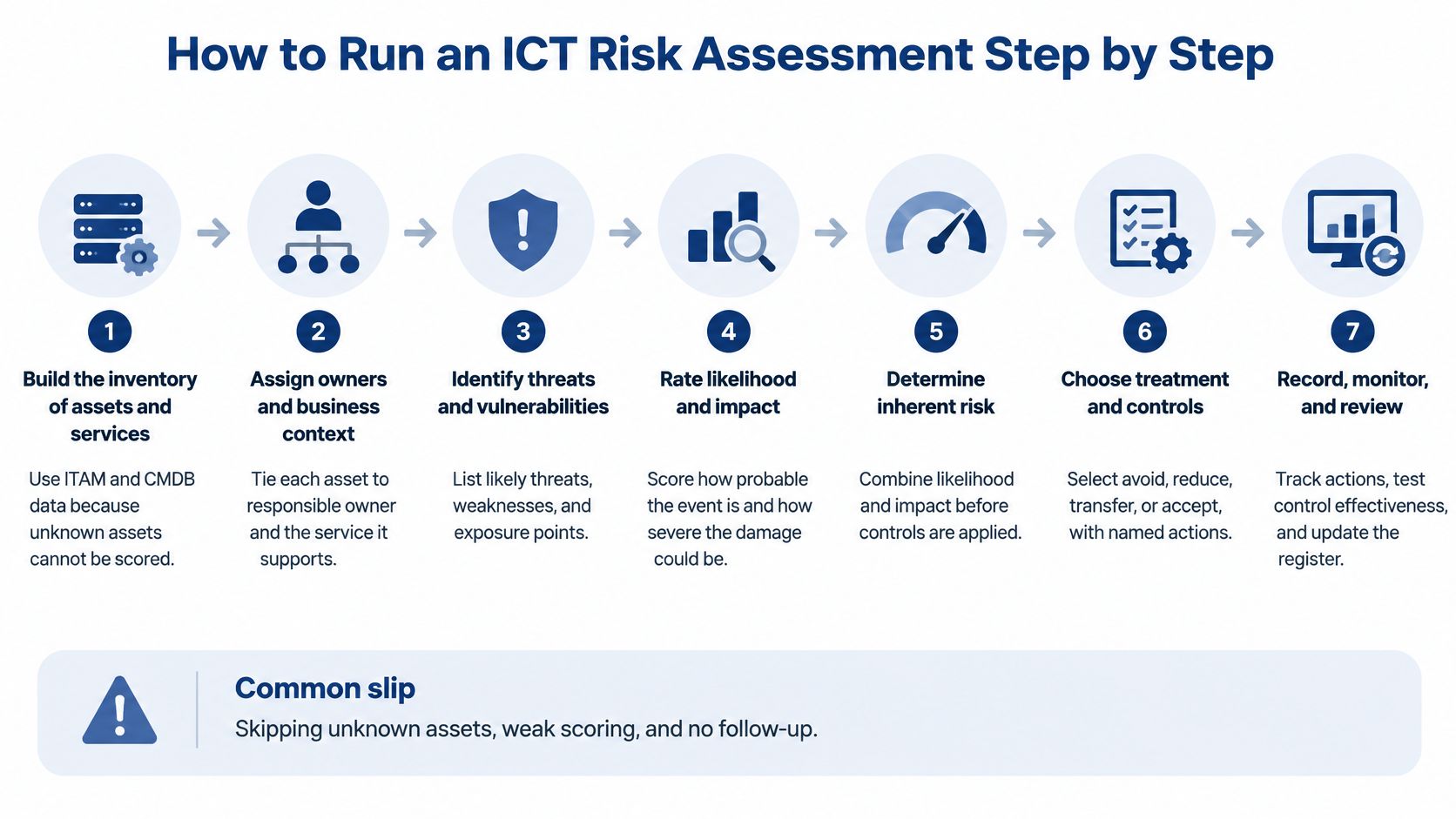
The seven steps
Build the inventory of assets and services. Pull ITAM and CMDB data, then reconcile it against discovery scans, cloud accounts and finance records. Unknown assets cannot be scored, patched or recovered, so treat every discovery mismatch as a finding. The common slip is trusting the CMDB because it's tidy. Discovery tools find what manual records miss.
Assign business criticality to each service. Rate services by customer impact, revenue at risk, regulatory duty and dependency count. A payroll interface used monthly can outrank a busy internal tool used hourly. Get the service owner to confirm criticality in writing, because that rating drives recovery order and funding.
Identify threats and vulnerabilities for each asset. Link each pair to the service the asset supports. A vulnerability on an isolated test box and the same vulnerability on your identity platform are different risks. Record exposure too. Internet-facing, remotely accessible and privileged systems deserve faster treatment than isolated internal ones.
Score likelihood and impact. Use the 1 to 5 scales below and score impact at service level. Programmes usually go wrong here. Scoring per asset understates an outage that cascades across twenty assets supporting one customer journey.
Calculate and rank. Multiply likelihood by impact for a score out of 25, then rank the register highest to lowest. Ranking forces honest conversation. If everything scores high, your scales are broken or your estate needs emergency funding. Either way, the committee should know.
Set a treatment for each risk. Choose mitigate, transfer, accept or avoid, with a named owner and a review date. Acceptance without an expiry date is how five-year-old vulnerabilities happen. Transfer through insurance or contract terms still leaves you owning the operational fallout, so record what remains after transfer.
Record and schedule the next review. Store the assessment, evidence and decisions where auditors and successors can find them. Book the next review before you close this one, and trigger an early reassessment after any major change to infrastructure, identity or a critical vendor.
Score | Likelihood (next 12 months) | Impact on a critical service |
|---|---|---|
1 | Rare, below 5% in a year | Negligible; no customer or staff effect |
2 | Unlikely, 5% to 20% in a year | Minor; one team affected for under a day |
3 | Possible, 20% to 50% in a year | Moderate; service degraded for a business day |
4 | Likely, 50% to 80% in a year | Major; customer-facing outage or regulatory finding |
5 | Almost certain, above 80% in a year | Severe; sustained outage or reportable breach |
Escalate any risk scoring 15 or above to the risk committee within the current reporting cycle. Don't let a severe score wait for the quarterly pack while the exposure stays live. Scores between 8 and 14 need an owner-approved treatment plan with dates. Below 8, monitor through normal operations and rescore at the next cycle. Whatever the score, write down the reasoning in one or two sentences. Future reviewers need to know why you chose 4 rather than 2, and that short note settles most audit challenges faster than any workshop.
Which Controls Match Each Risk Type
Settle the funding question before you buy anything. When legacy remediation competes with a new platform, fund the oldest critical vulnerabilities and configuration drift on internet-facing services first. Another detection tool watching an unpatched, misconfigured estate mainly gives you better footage of the incident.
Rank each funding option by register score and vulnerability age. Record the decision, the owner and an expiry date, so a postponed fix becomes a visible accepted risk rather than a forgotten one.
Three layers, not one
Controls work in three layers. Preventive controls stop the event, detective controls spot it early and recovery controls limit the damage. A category covered by only one layer fails as soon as that layer does, and every layer fails eventually.
Risk category | Preventive control | Detective control | Recovery control |
|---|---|---|---|
Cyber security | Phishing-resistant MFA on privileged access | Alerts for impossible travel and token misuse | Credential revocation and session termination procedure |
Availability and operations | Redundant paths and capacity limits | Synthetic monitoring on critical services | Tested failover in dependency order |
Configuration and change | Secure baseline builds enforced at deployment | Configuration drift scans | Rollback through the approved change record |
Third-party and vendor | Security clauses and right-to-audit in contracts | Annual vendor attestation review | Exit plan with tested data return |
Data and privacy | Classification before records are stored | DLP alerts on ticket attachments | Restore from classified and encrypted backups |
Resilience and recovery | Backup policy with immutable copies | Backup success and restore test reports | Restore runbook with RTO and RPO per service |
Legacy and technical debt | Retirement or isolation plan for unsupported systems | Vulnerability age report | Compensating segmentation until decommissioned |
AI and automation | Approved-tool list and scoped agent permissions | Agent action logging and anomaly alerts | Disable the agent and revert changes from the log |
The row that surprises people most is usually third-party recovery. An exit plan with tested data return sounds like procurement paperwork until a vendor outage or dispute leaves you negotiating for your own records. Test data export while the relationship is friendly.
The control people skip: immutable backups mean nothing until a restore succeeds under time pressure, with the actual on-call team running it.
Patching, baselines and the ITSM link
Give emergency treatment to actively exploited vulnerabilities on internet-facing identity, remote-access, virtualisation and management systems. When patching would interrupt critical operations, document compensating controls instead, such as segmentation, application allow-listing, privileged-access restrictions and enhanced monitoring. Compensating doesn't mean permanent. Set a review date.
Secure baselines enforced at deployment prevent most drift before it starts. Build the hardened configuration into your images and infrastructure templates, then scan for exceptions. Fixing drift one ticket at a time while new systems deploy unhardened is mopping with the tap running.
Connect every detective control to your ITSM workflow. When a control fails, the platform should open a ticket against the CMDB item, assign the owner and attach the evidence automatically. If you're comparing platforms for that workflow, review the HaloITSM pricing and licensing options against the ticket volumes your control failures will generate.
Recovery planning deserves the same rigour, and this guide to business continuity after a ransomware attack from We Fix PC Laptop walks through restore sequencing in practical detail. Apply one rule to every control in the table. No owner, no test frequency and no evidence means the control doesn't exist, whatever the policy says.
Who Owns ICT Risk and How Governance Works
ICT risk governance works only when decision rights are clear. Assign accountability at four levels and record who owns each decision.
Board. Sets ICT risk appetite and tolerance, including acceptable disruption and the services that require the strongest continuity.
Risk committee. Reviews the highest-scoring risks each cycle and challenges owners when treatment dates slip.
CIO and CISO. Design controls, set recovery targets for critical services and report when available funding cannot meet those targets.
Service owners. Accept residual risk for their services and document the operational trade-offs behind each decision.
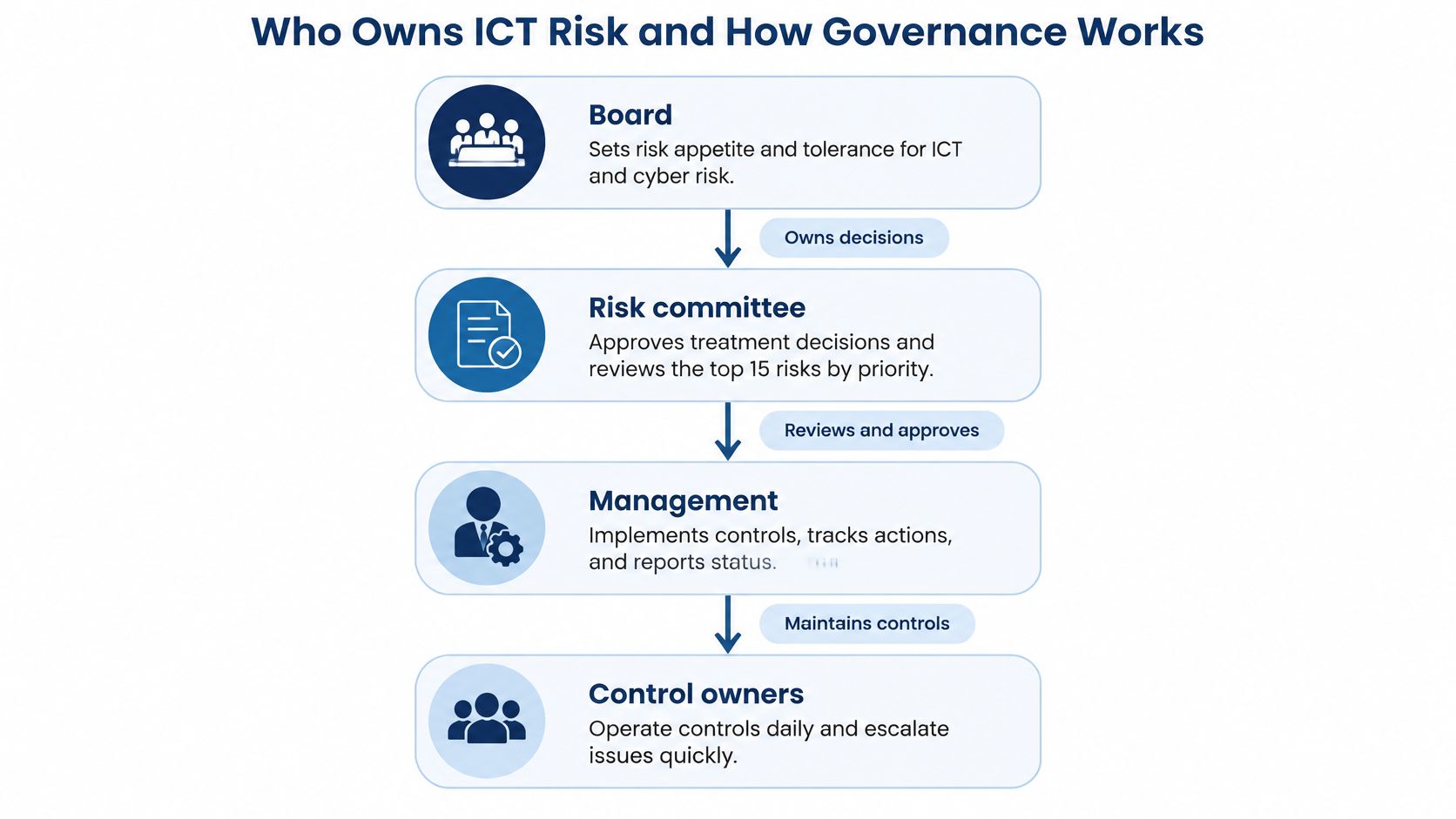
No one should accept risk for a service without a named owner and an expiry date. In the three-lines model, business and service owners manage risk in the first line, risk and compliance provide oversight in the second, and internal audit gives independent assurance in the third. If one team owns, oversees and assures the same control, its assessment needs independent challenge.
The national picture behind your governance
The UAE National Cyber Security Index profile describes a National Cybersecurity Strategy focused on identifying critical national assets and associated risks, with processes for reporting, compliance, incident response and crisis management. Its profile scores cyber-incident response at 5 out of 6 indicators, or 83%, while cyber-crisis management scores 1 out of 5 indicators, or 20%.
That gap points to a practical governance risk: incident response may receive regular attention while crisis decisions involving executives, communications and legal teams remain untested. Regulators expect evidence that cybersecurity policies are implemented in practice, not just documented.
Governance decisions also depend on workable approval and service-management workflows. If Freshservice runs your service desk, review the Freshservice pricing and approval workflow options when assessing whether your current setup supports the approvals you need.
Use this checklist to test whether governance operates in practice:
Named owner: Every critical asset and service has one accountable person.
Standing agenda: The risk committee reviews scores, exceptions and overdue treatments each cycle.
Exercised playbooks: Incident and crisis plans are tested on a schedule, with findings recorded as risk-register entries.
Regulatory Requirements in the GCC and EU
Start with the regime that most likely applies to your sector. A UAE licensed financial institution answers first to the Central Bank of the UAE, and a Gulf group with European financial operations may also fall under DORA. Most organisations over-collect frameworks and under-produce evidence. Do the opposite.
The Central Bank of the UAE Article 8 rulebook on ICT and cybersecurity management requires licensed financial institutions to embed ICT and cybersecurity risk within the operational-risk framework and operational-resilience approach. It sets four mechanics, covering identification and assessment, proportionate mitigation, regular monitoring and testing, and ongoing proactive management. Risk appetite statements must also address ICT risk, resilience and acceptable disruption.
At national level, the UAE government summary of the Information Assurance Regulation describes minimum protection requirements applied through a risk-based approach. The regulation defines roles at national, sector and entity level, requires ongoing monitoring and improvement, and provides a common control catalogue aimed at threats exploiting known vulnerabilities. Compliance is a cycle, not a certificate.
For European exposure, the Austrian Financial Market Authority DORA guidance on ICT risk management confirms the framework must be reviewed at least annually, with ICT-supported functions, assets and dependencies classified and documented. Legacy systems need a specific assessment at least annually and before and after connecting new technologies, and a further assessment follows each major change in infrastructure.
Regime | Who it applies to | What it requires | Evidence to keep |
|---|---|---|---|
DORA (EU) | Financial entities operating in Europe | Annual ICT risk framework review; annual assessment of legacy systems; assessment after major change | Review minutes, asset classification records, change-linked assessments |
CBUAE rulebook, Article 8 | Licensed financial institutions in the UAE | ICT and cyber risk inside the operational-risk framework; risk appetite covering ICT and resilience | Risk appetite statements, testing results, monitoring reports |
UAE Information Assurance Regulation | Entities protecting government and sensitive information | Risk-based minimum controls; roles at national, sector and entity level; ongoing monitoring | Control catalogue mapping, role matrix, monitoring logs |
GDPR (EU) | Organisations processing EU personal data | Records of processing; data protection impact assessments for high-risk systems | Processing register, DPIA sign-off records |
One control library, many citations
Map one control library to every regime you answer to, so evidence is produced once and cited many times. A drift scan that satisfies your internal baseline can also support DORA classification reviews and Central Bank monitoring, provided the mapping is documented. Separate evidence packs per regulator guarantee contradictions.
Regulators check evidence, not policy documents. A beautiful policy with no test result behind it raises more questions than a plain one with logs.
Keep this evidence checklist ready before any supervisory conversation:
Review minutes: Dated framework and committee reviews with decisions recorded
Asset classification records: Functions, assets and dependencies with owners
Change-linked assessments: Risk reviews attached to major change records
Risk appetite statements: Board-approved tolerance for ICT disruption
Test results: Restore, failover and control tests with failures included
Processing registers: Personal data records and DPIA sign-offs where required
KPIs and Reporting That Show Risk Is Falling
A risk KPI matters only when a poor result prompts action. Track measures that reveal operating weaknesses, such as overdue vulnerabilities, unowned assets and failed changes, and connect each one to a decision. Eight challenged measures are more useful than a dashboard of metrics nobody acts on.
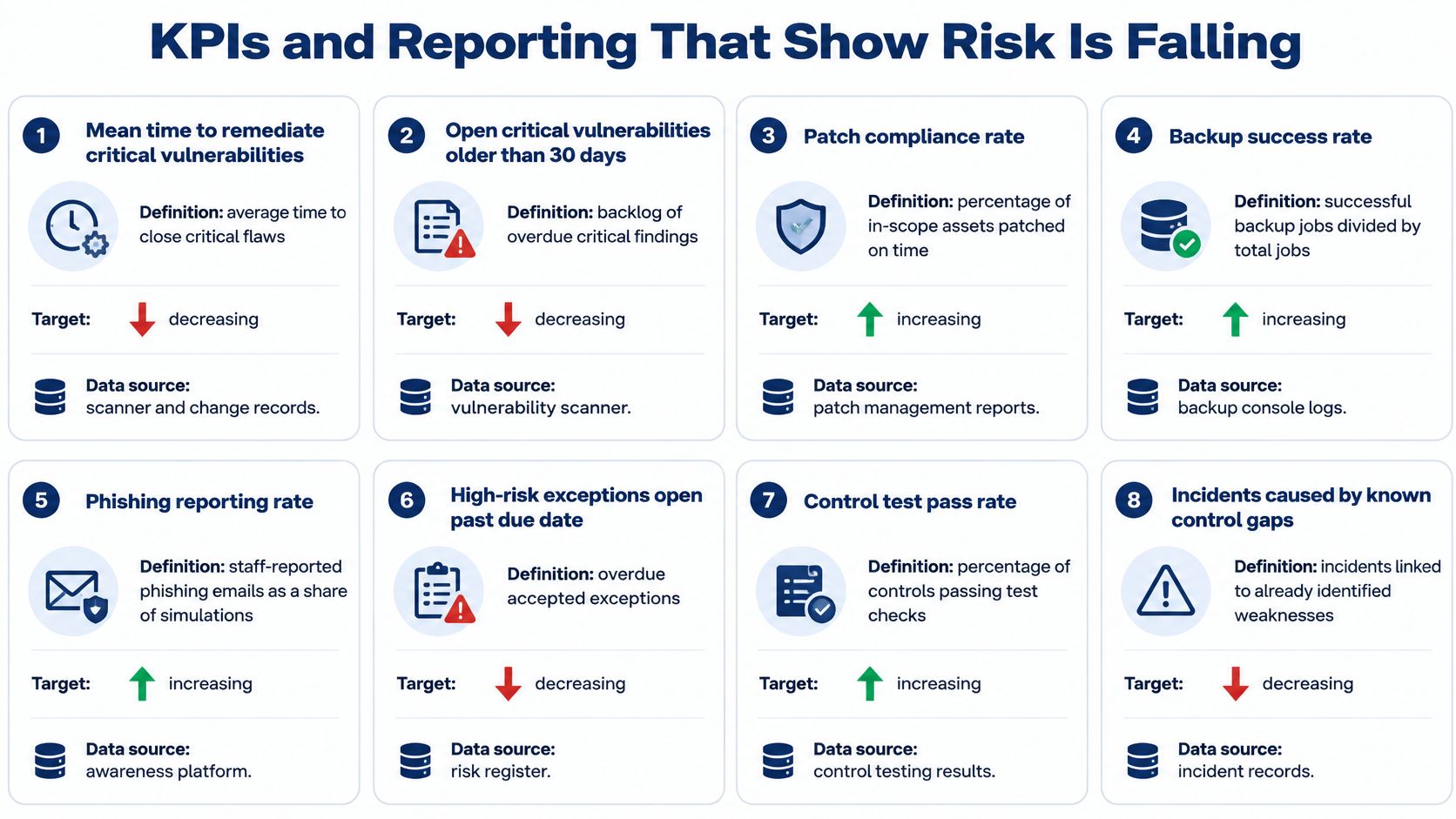
Mean time to remediate critical vulnerabilities. Track average days from detection to verified closure, with a downward trend as the target. Set a risk-based ceiling, such as 30 days for internet-facing systems. Match scanner findings to change records so closure reflects a completed fix, not just a status update.
Vulnerability age. Track the share of critical findings open beyond 12 months, with a downward trend toward zero. Use the scanner's first-seen date to expose findings that remain unresolved because of legacy systems, ownership gaps or deferred maintenance.
Critical assets with a named owner. Measure the percentage of critical assets with an accountable owner, targeting 100%. Source the measure from the CMDB, and route missing ownership to the relevant service owner for action.
Exception age. Count risk acceptances past their review date, with a downward trend as the target. Pull the measure from the risk register and assign overdue exceptions for review rather than allowing them to persist without a current decision.
Restore test pass rate. Measure successful restores against each critical service's RTO and RPO, with an upward trend as the target. Report by service. An overall average can conceal a service that cannot be recovered within its required objectives.
Changes with completed risk assessment. Track the share of major changes with a documented assessment, aiming for an upward trend. Use change records as the source and make completion part of the workflow. Check your current ITSM plan's change-management features against this reporting need, including the SysAid pricing and plan information.
Mean time to detect a control failure. Measure hours between a control failure and an alert, aiming for a downward trend. Use monitoring and ITOM alert data to identify gaps between failure and detection.
AI agent actions with logging and approval. Track the share of automated actions that are logged and, where required, approved, aiming for an upward trend. Use agent and workflow logs to identify actions without an adequate record or approval.
Build the measures from ITSM and ITOM records wherever possible. A failed control can create a ticket linked to the relevant CMDB item, keeping evidence and remediation status together. Manual spreadsheets make it harder to trace changes and challenge optimistic reporting.
The monthly operational pack should show all eight KPIs, overdue treatments and failed tests for the CIO and service owners. The quarterly board view should focus on the top risks, their direction of travel and funding decisions required. Report exceptions plainly: a falling average does not offset a critical service with an overdue fix or an untested recovery path.
Assess Your Maturity and Start the 90-Day Roadmap
Find the highest level in this table whose signal your organisation already shows. That row's next move is your starting point. Don't claim a level because the policy exists. Claim it because the signal is visible in operational data.
Level | Typical state | Signal you have reached it | Next move |
|---|---|---|---|
1 Initial | Ad hoc registers and spreadsheets | No named owner for critical services | Build a basic asset inventory |
2 Repeatable | Inventory exists; annual assessment | Owners named for most critical services | Adopt the common eight-category register |
3 Defined | Common scoring and mapped control library | Controls tested against each regime | Automate evidence capture |
4 Managed | KPIs reported to the board | Failed controls raise ITSM tickets automatically | Extend coverage to AI and third-party workflows |
5 Optimised | Predictive, continuous assessment | Risk trends drive funding decisions | Review quarterly and share practice across entities |
Your first 90 days
Days 1 to 30. Run a discovery workshop, build the asset inventory and confirm which regimes apply. Every DataLunix consulting engagement starts with discovery workshops, fit-gap analysis and readiness assessments, which map client requirements to technological capabilities, determine solution scope and identify organisational or technical gaps. That structure works internally too. Map requirements to capabilities, name the gaps and agree what this quarter won't cover.
Days 31 to 60. Score the top 20 services and treat the oldest critical vulnerabilities first. Resist scoring everything. Twenty services scored properly, with owners and treatments, beat two hundred scored in an afternoon. Smaller firms sequencing their first programme can sanity-check priorities against these small business cyber security priorities for 2026 from MY CYBER GUARD, then scale the same order of work to enterprise depth.
Days 61 to 90. Adopt the KPI set, connect failed controls to ITSM tickets and present the first board report. Expect the first report to look worse than the last informal update. That's measurement working, not risk rising. Say so plainly, show the trend you intend to produce and ask for the specific funding or acceptance decisions you need.
Set a realistic target of moving one maturity level within 12 months. Programmes that promise level 4 by next quarter usually deliver nicer templates at level 1. Track progress with the KPIs, rescore quarterly and let vulnerability age and exception age prove whether the roadmap is working.
To act this quarter, book a discovery call with the DataLunix.com team. A senior consultant maps your current tooling, licence position and process gaps against this roadmap, with no obligation. Ask for a scoping conversation before you commit to anything, and bring your ugliest register entries. Those are the ones worth discussing.
If your register is full of unowned assets and ageing vulnerabilities, DataLunix can help you connect ICT risk management to the ITSM, ITOM and ITAM workflows your teams already use, so controls, evidence and reporting run as one process. Start with a discovery call where a senior consultant maps your tooling, licence position and process gaps with no obligation. Visit DataLunix to book your scoping conversation today.